247 CTF-ICMP Tunneling
This write-up covers extracting a hidden flag from ICMP traffic — a hands-on look at ICMP tunneling / data exfiltration, showing protocol discovery, payload extraction & reassembly, file carving of the embedded image, and practical defenses to detect and mitigate such attacks.
Provided is the following pcap file to analyse. The first thing I did was get a feel for the capture and confirm the relevant protocol. I wanted to know which protocols were present so I could focus on the correct packets. 
The output included eth, ip, icmp, and data, confirming that ICMP packets with payloads were present. This justified focusing on ICMP payload extraction. I next attempted to extract the payload bytes using a common tshark field name.

-e icmp.data is a natural guess — it would give the ICMP payload as hex for each frame, which I could concatenate in order to reconstruct any embedded content.However, Tshark reported that icmp.data was not valid in this capture/version. That was a dead end for that exact field name, but not for the overall approach — I needed to find the right field name.I then tried data.data and it worked. 
Once I had payload.hex, the next step was to convert it into raw bytes and check file signatures and readable strings.
1
2
3
4
5
6
7
xxd -r -p payload.hex > payload.bin

file payload.bin

hexdump -C payload.bin | head -n 40

strings payload.bin | head -n 40
xxd -r -p translates hex to a binary file. file attempts to identify file types by magic bytes. hexdump and strings help spot readable text and file headers. 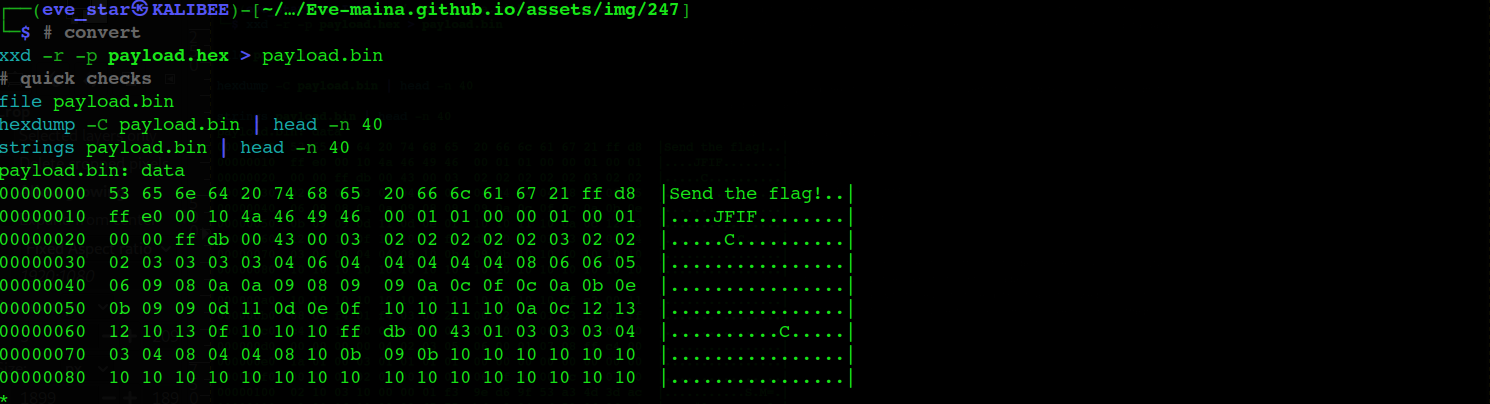
I observed that the binary began with the ASCII text Send the flag! followed immediately by JPEG magic bytes (FF D8 FF E0), which suggested a JPEG image was embedded in the payload. Finding the JPEG magic meant I could carve the image out from the binary by locating the JPEG start marker (0xFFD8).
1
2
3
4
5
6
7
8
9
10
11
python3 - <<'PY'

b = open('payload.bin','rb').read()

i = b.find(b'\xff\xd8')

open('payload.jpg','wb').write(b[i:])

print('wrote payload.jpg at offset', i)

PY
File carving by magic header is a robust technique when a file is concatenated into a stream. Starting at the JPEG header extracts a valid image file that can be opened with any image viewer. I then opened the image (using xdg-open payload.jpg on Linux) and visually inspected it. The image contained the flag.

I found the flag 247CTF{580e6d627470448064fa7bffd6284ddf}
What this challenge mimics in the real world
This challenge simulates ICMP-based data exfiltration (a covert channel). Attackers can place data inside ICMP payloads to bypass firewall rules or monitoring that do not inspect ICMP contents deeply. It demonstrates how a legitimate protocol can be abused to move data stealthily.
Mitigations and detection
Restrict ICMP: limit which ICMP types are allowed and where; avoid permitting large payloads from internal hosts to the Internet unless needed.
Deep packet inspection (DPI): inspect ICMP payloads for file magic signatures and unusual binary data.
Anomaly detection: alert on abnormal ICMP volume, frequent large payloads, or high-entropy payloads.
Egress filtering: enforce strict outbound policies so hosts cannot freely communicate with arbitrary external endpoints.